What employers see when you apply on Eternity Job
Eternity Job Career Team20 October 2026 · 8 min read
When you press Send application, the employer gets far more than the CV you attached. The line under the button says it plainly: they "will see your name, contact details and anything above". What it doesn't spell out is that they also get your Eternity Job profile, in full, and they can sort and filter a pile of applicants by the details in it.
Most people spend an hour on the CV and thirty seconds on the profile. That is the wrong way round here. A credit analyst applying for roles at banks around KL Sentral had a polished CV and an empty notice period on their profile. Every employer who filtered applicants by notice period lost the analyst without ever opening the file.
What arrives with the application
Four things come from the apply form itself.
The first is your name, email address and phone number, taken from your account and profile at the moment you apply. The form shows them under the button so you can check them. Your name is edited on your account, and your phone number on your profile. If you change either afterwards, the employer still has what you sent.
The second is the CV you choose. You can pick one from your saved CVs, upload a new one, or, if the employer allows it, apply without one. The employer sees which you did. Without a CV, their screen says "They applied without a CV", and employers can filter for applicants with or without one.
The third is the box labelled Anything you want them to know. It is optional, and the hint suggests "a few lines on why this role, and what you have done that is close to it". That is good advice. Three sentences that connect your last job to this one will do more than a page of enthusiasm.
The fourth is your answers to screening questions, if the employer set any. These appear under a heading with the company's name and the word "asks". The employer reads them under Screening answers.
Screening answers are filters
This is the part people underestimate. Employers can filter their applicants by screening answers. A yes-or-no or multiple-choice question becomes a set of buttons they can press to show only the people who gave a particular answer. A number question, such as "How many years of SST filing experience do you have?", gets an "at least" filter.
Number questions take a plain number, and the filter compares it exactly. If you have two and a half years of SST work, typing 3 to clear a likely cut-off is the kind of rounding an interviewer will test. On choice questions, choose the option that is true. If you stretch an answer and get through, the interview will find the gap quickly, and you will have spent your credibility on a first-round filter.
Your profile, in full and as it is today
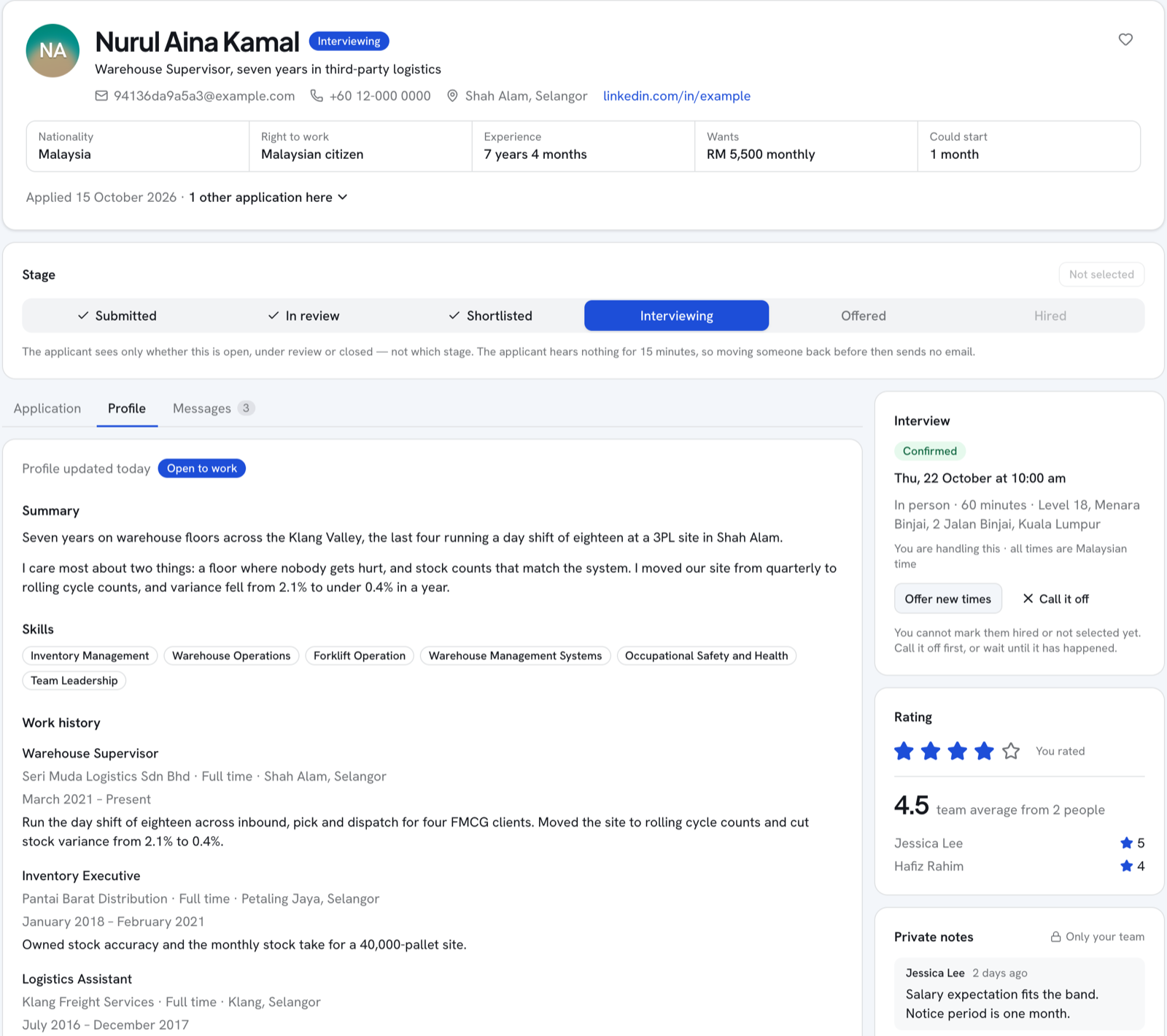
The employer opens your application on two tabs, Application and Profile. The second tab is your Eternity Job profile, and it is read live. If you improve your profile after applying, every employer you have applied to sees the improved version the next time they open it. That is worth knowing on a slow week.
Here is what the Profile tab shows them:
Your photo, your title and your summary
Your city, state and country, your nationality, and your right to work in Malaysia
Your LinkedIn link, if you added one
Your skills
Your work history, including every company name, with dates and descriptions
Your education, with qualification, field of study and grade
Your licences and certifications, including any credential numbers you entered
Your languages and how well you speak them
Your total experience and your highest qualification
What you want next: the roles, employment types, work arrangements and states you chose, your expected salary, and how soon you could start
Whether you have ticked "I am open to new roles right now"
Note the bit about company names. If you set your profile to be found by employers who are searching, a limited profile can hide some details from them. That setting is about being found. As the profile page puts it, "an employer you apply to sees your application and your profile in full."
The fields employers filter on
Beyond screening answers, employers can narrow their applicants by:
Notice period, as "Notice 1 month or less" and similar
Least experience, in years
Least qualification
State
Right to work, when the job has a nationality requirement
Each of these reads a field on your profile. If you have left it blank, a filter on it has nothing to match, and you drop out of the list for that employer. The credit analyst's empty notice period is the commonest version of this. Two of them you cannot type in directly. Total experience is added up from the dates in your work history, and your highest qualification is taken from the education you list. If your work history is half-filled, a "5+ years" filter will treat a seven-year analyst as a junior.
So, before your next application, open your profile. Fill in How soon you could start, your state and Right to work in Malaysia, and make sure every job and qualification you hold is listed with its dates and level. Our guide to notice periods in Malaysia will help you choose the right option if you are unsure what your contract says.
Making each part count
Your title and summary are the first thing anyone reads on that tab. Write the title as the job you do, such as "Credit Analyst, Corporate Banking", rather than "Seeking new opportunities". Keep the summary to three or four lines about what you are good at, with one number in it.
Work history should read the same as your CV. A recruiter who sees different dates on the two will notice, and it will cost you more than a gap would. If you do have a gap, our guide to explaining a gap in your resume covers how to put it.
Use skills for the specific ones. "Microsoft Excel" says little. "IFRS 9", "SQL" and "Power BI" each tell a recruiter something.
Credentials are shown with their numbers, if you entered them. That is useful for anything an employer would check, such as a professional body membership. Leave the number out if you would rather give it when asked.
Expected salary is shown to every employer you apply to. Put in the figure you would actually accept. A number set high to "anchor" can quietly rule you out before anyone has spoken to you.
What you see, and what you don't
On your side, each application lives on /applications. Its page shows a short progress line, Sent, Under review, then Decision, and one of four statuses: Submitted, Under review, Closed or Withdrawn.
The employer works with more stages than that. They can move you through review, shortlisting, interviewing and an offer, and to you all of those show as Under review. Hired and turned down both show as Closed. This is deliberate. A move from shortlisted back to review means nothing to you, and seeing it would only cause worry. You will know you are in an interview when the employer invites you to one, because the invitation appears on the same page.
You will often see a line such as "Viewed 3 times · CV downloaded once". It counts how often the employer's team opened your application and downloaded your CV. An employer can switch this off for a job before it goes live, so a missing count does not always mean nobody has looked.
Some things the employer keeps to themselves, and you will never see them:
The star ratings their team gives you
Their private notes about you
An AI suggestion, shown to them as Why this looked like a fit, which flags only applicants who look like a clear strong fit
Whether they have put you on their company blacklist. Their own screen says of it: "They are never told."
The employer can also see your other applications to their own jobs, as a line such as "1 other application here", or "First time applying here". They cannot see what you have applied for at other companies.
Messages, and withdrawing
The employer starts any conversation. Once they write, the message appears on your application page and you can reply there. Their messages show under the company's name. Messaging closes when the application is closed or withdrawn. If the emails get too much for one job, the thread has a Mute emails for this job option.
If you change your mind, the application page has Withdraw application. The employer sees that you withdrew, it cannot be undone, and you cannot apply for that job again. Withdraw when you mean it, for instance once you have accepted another offer, and do it promptly. It is a courtesy recruiters remember.
The analyst filled in the notice period, the right to work and the last two years of work history that had never made it onto the profile. Because employers read profiles live, the banks already applied to saw the new version the next time they opened the file. One of them called the following week.