How to read company reviews before you apply
Eternity Job Career Team20 October 2026 · 8 min read
An accounts executive had a second interview booked at a shared-services centre in Petaling Jaya before finally opening the company's reviews. The overall score was a respectable 3.8. Sorting by lowest rated turned up four reviews from the past year, written by different people in different teams, all saying the same thing: month-end ran past midnight and nobody was paid for it. The executive went to the interview anyway, and asked about it directly. The answer said more than the score ever could.
That is the right way to use reviews. They will rarely make the decision for you. What they can do is tell you which question to ask.
Where to find them
Every company on Eternity Job has a profile, which you can reach from any of its jobs or by browsing /companies. Two tabs on that profile matter here: Reviews, written by people who say they have worked there, and Interviews, written by people who applied and went through the process.
They are different kinds of evidence, and they deserve different weight.
Interview reviews carry more weight
Nobody can write an interview review on Eternity Job out of the blue. They come only from people who applied for one of the company's jobs through the site and reached the interview stage. Some time after the interview, we ask them how it went. The prompt shows up on their application page, and there is a weekly reminder email for anyone who has not answered yet. If you have not applied, there is no form to fill in.
Like company reviews, each one is read by a moderator before it goes live, and the reviewer can hide their job title. That makes them the most reliable thing on the profile. Each one gives:
An overall rating of the experience
How hard it was, from Very easy to Very hard
What happened next: Got an offer, No offer, Still waiting or I withdrew
A written account, and often a list under What they asked
You can filter by outcome, which is the single most useful thing on that tab. Read the No offer reviews first. People who were turned down tend to be specific about where it went wrong, and their accounts of the questions are usually the most detailed. Then read Got an offer to see what the successful candidates did differently.
Pay attention to I withdrew. One candidate walking away tells you little. Several, all citing a long silence between rounds or a salary range that moved, tells you how the company treats people it has not hired yet. That is usually a fair preview of how it treats people it has.
Company reviews, and what moderation does
Company reviews are open to anyone with a jobseeker account. They are not tied to an application, so treat them as accounts from people who say they worked there. That is the same standard you would apply to a friend of a friend.
Every review is read by a moderator before it goes live, and a reviewer can only write one review per company. Moderators can turn a review down with a note to the reviewer, for example if it names a colleague, and then it does not go up. A reviewer's name never appears on the public page. What does appear is whether they are a Current employee or Former employee, their job title unless they chose to hide it, and the month the review was published.
Each review has a star rating, a headline, a Pros section and a Cons section. Reviewers can also rate five areas when they can speak to them: Culture, Work-life balance, Pay & benefits, Management and Career growth. They can say whether they would recommend the company to a friend.
Moderation stops abuse. It does not check facts. A moderator cannot tell whether the overtime really ran to midnight, and it would be odd to expect them to. That job falls to you, and the way to do it is to look for agreement between people who have no reason to agree.
What the company can and cannot do
Companies can reply to any review publicly. The reply appears under the review as Response from the company, with the month it was posted. They can also flag a review they think breaks the rules. A flagged review stays up while a moderator looks at it, and the moderator decides whether it stays or comes down. The company cannot delete reviews or edit what a reviewer wrote.
A company can choose not to accept reviews at all, and its Reviews tab will say so plainly: the company "does not accept reviews". There is a catch that works in your favour. That choice is only open until the first review is approved. After that, reviews stay on for good.
So a company with reviews switched off has made that call before anyone had a chance to say anything. It is a small signal. I would not rule a company out on that alone, but I would lean harder on its interview reviews, on what people in your network say, and on your own questions in the interview.
Read the replies, too. A company that answers a harsh review with specifics, such as what it changed and when, is telling you something useful about its management. A company that pastes the same polite paragraph under every negative review is telling you something too.
Read the pattern, not the review
Once a company has three reviews, its Reviews tab shows a summary: the average rating, how many reviews sit at each star level, the percentage who would recommend it, and an average for each of the five areas that reviewers rated. Below that, the reviews themselves can be sorted Newest first, Highest rated or Lowest rated, and you can tap any star level to see only those.
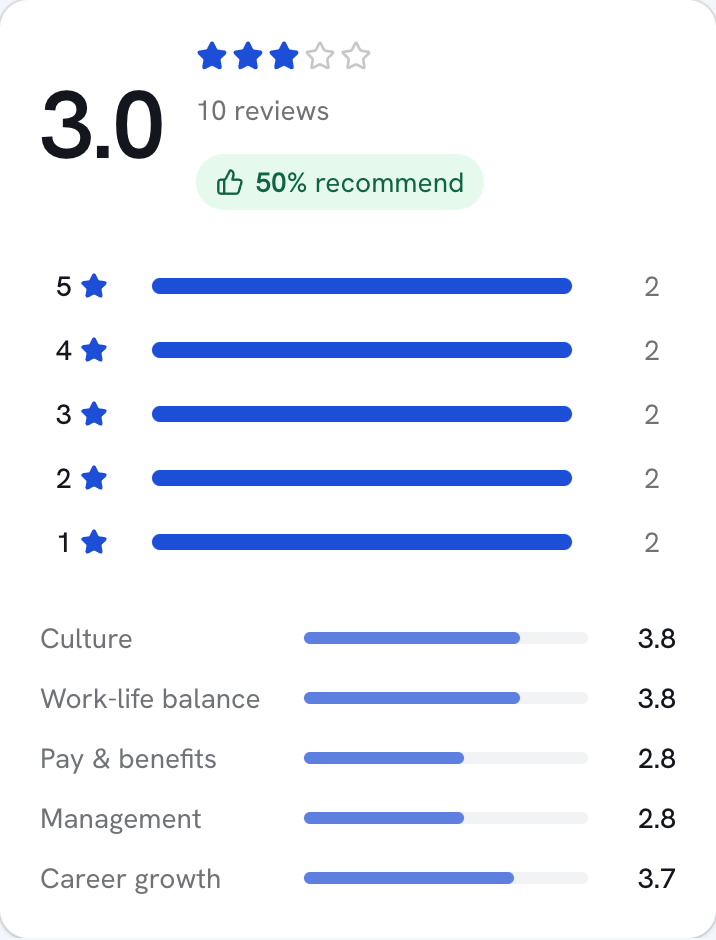
Here is the order I would read them in.
Look at the five area averages before the overall score. A company with 4.2 overall and 2.6 for Work-life balance is a very different place from one with an even 3.8 everywhere. Decide which of the five you care about most and read with that in mind.
Sort by Lowest rated and read the first page. You are looking for complaints that repeat across different job titles and different months. One person hating their manager is about that manager. Five people describing the same approval process is about the company.
Then sort by Highest rated and read for specifics. "Great culture" is worth nothing. "Flexible hours approved by my line manager without fuss" is worth a great deal.
Check the dates. A run of bad reviews from two years ago followed by better ones since can mean new leadership. The reverse is worth asking about.
Weigh current employees against former ones. Former employees are freer to be blunt, and also more likely to be bitter. Current employees know the place now. When the two agree, believe them.
Reviews that read like copy from the company's own careers page deserve a second look. So do unusually short five-star ones that arrive close together.
Take it into the interview
The point of all this reading is a sharper interview. If the reviews keep mentioning late nights at month-end, ask what a normal close week looks like, and what time people actually leave. If several people mention that promotions stalled, ask how many people in the team were promoted last year, and from which grade. If pay comes up again and again, ask how increments are decided. Our guide to the annual bonus and increment explains what a reasonable answer sounds like.
Ask in a neutral way. "I've read that month-end can run late. What does that week look like for the team?" gives the interviewer room to be honest. Watch for the difference between an answer with numbers in it and one made of reassurance. For more on this, see our list of questions to ask the interviewer.
The accounts executive asked that question. The hiring manager paused, then said the team had hired two people that quarter to fix exactly that, and named the system it had moved to. It was a specific answer, and it matched what the most recent reviews said. The executive took the job.
Writing one yourself
Reviews only work if people write them. If you have worked somewhere, go to its Reviews tab and choose Write a review. You can hide your job title, in which case the review will say only Current employee or Former employee. Our moderators still see the title. You cannot review a company you are part of on Eternity Job.
When you are done, press Send for review. You can follow what happens on /reviews, where each review shows as In moderation, Published, Not published or Removed, with any note the moderator left. You can also delete your review from there.
Be as specific in your own review as you would want others to be. A year from now, someone with an interview booked will be reading it the night before an interview.